
How to register a new admin account on Athena Board
When you are added to a board as an administrator you will receive a welcome email from the Athena Board admin system which will look something like this;
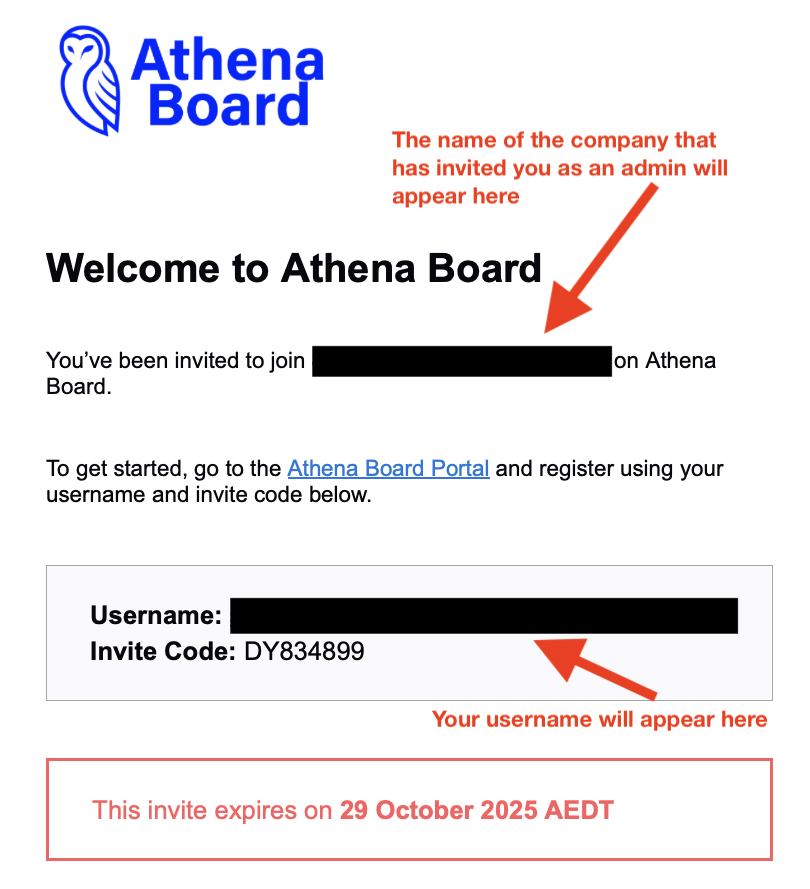
The blanked out areas will contain details specific to your invitation, the company that has invited you and your username – this is an email address.
Also included is the invite code. This is NOT your password. The invite code shown above is for illustrative purposes only and will be different in your welcome email.
The invite code is also only valid for the period displayed in the welcome email (two weeks from the time the registration was created). If you are unable to register within this time, simply contact your board administrator (if it was another admin that created the invite) or Athena Board support and a welcome email can be regenerated for you with a new invite code.
Open your browser to https://admin.athenaboard.com.
You will be asked to enter the username (from the welcome email), select your password (you can choose anything that matches the displayed criteria) and then your invite code. Do not enter the invite code as the password.
Lastly, you will be sent an authentication code via SMS to your mobile phone (if we have a mobile phone number for you) or via email.
If the SMS does not arrive, you can request a resend via email as a fall back.
Once this process has been completed you are now registered with Athena Board
IF you have any issues, please contact us at support@athenaboard.co